
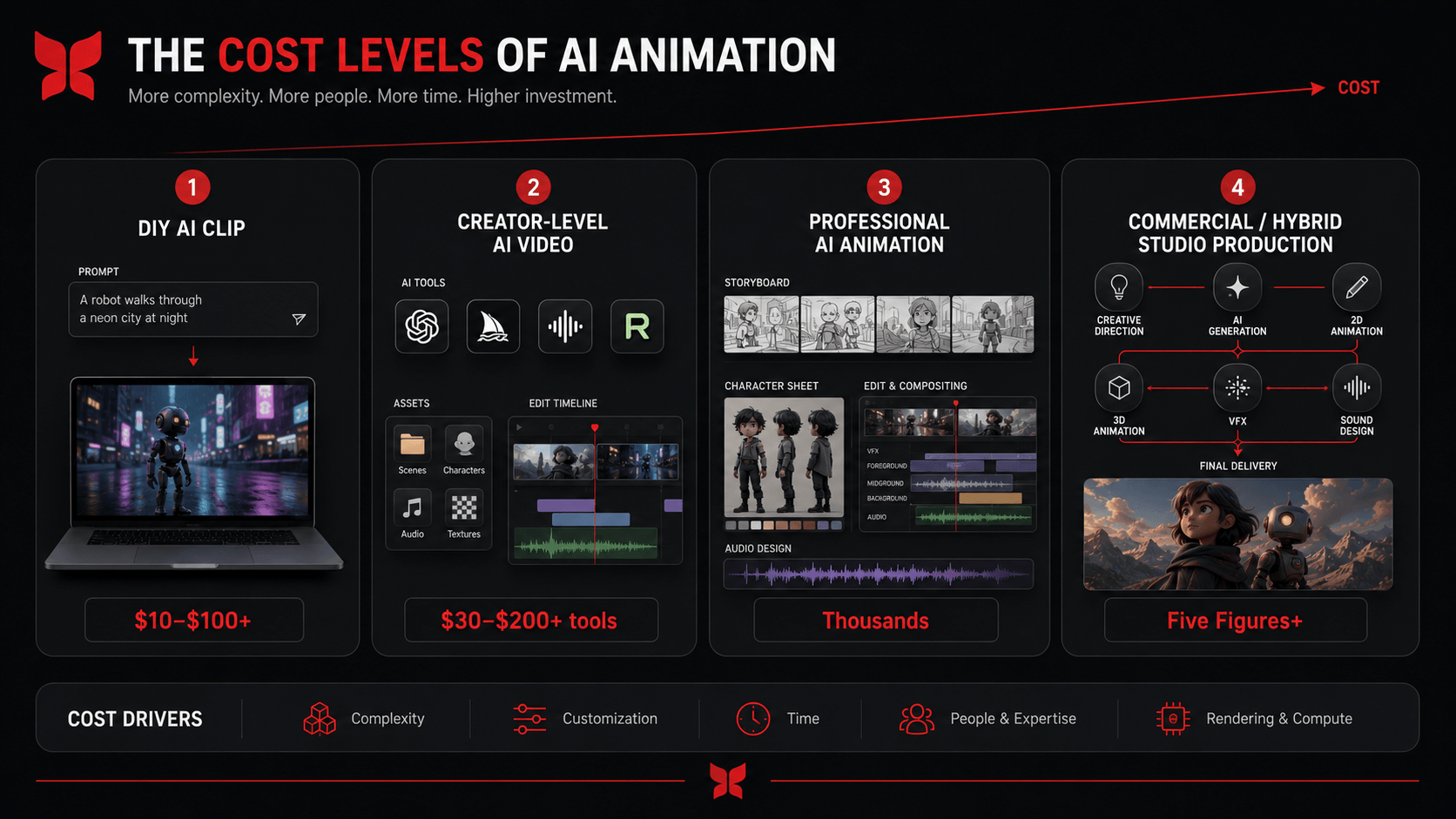
AI animation can cost less than $100 if you are experimenting with short clips yourself, while a professionally produced commercial, music video, trailer, or branded animation can run into thousands or even tens of thousands of dollars.
That gap makes more sense once you separate the cost of generating AI video from the cost of producing finished animation.
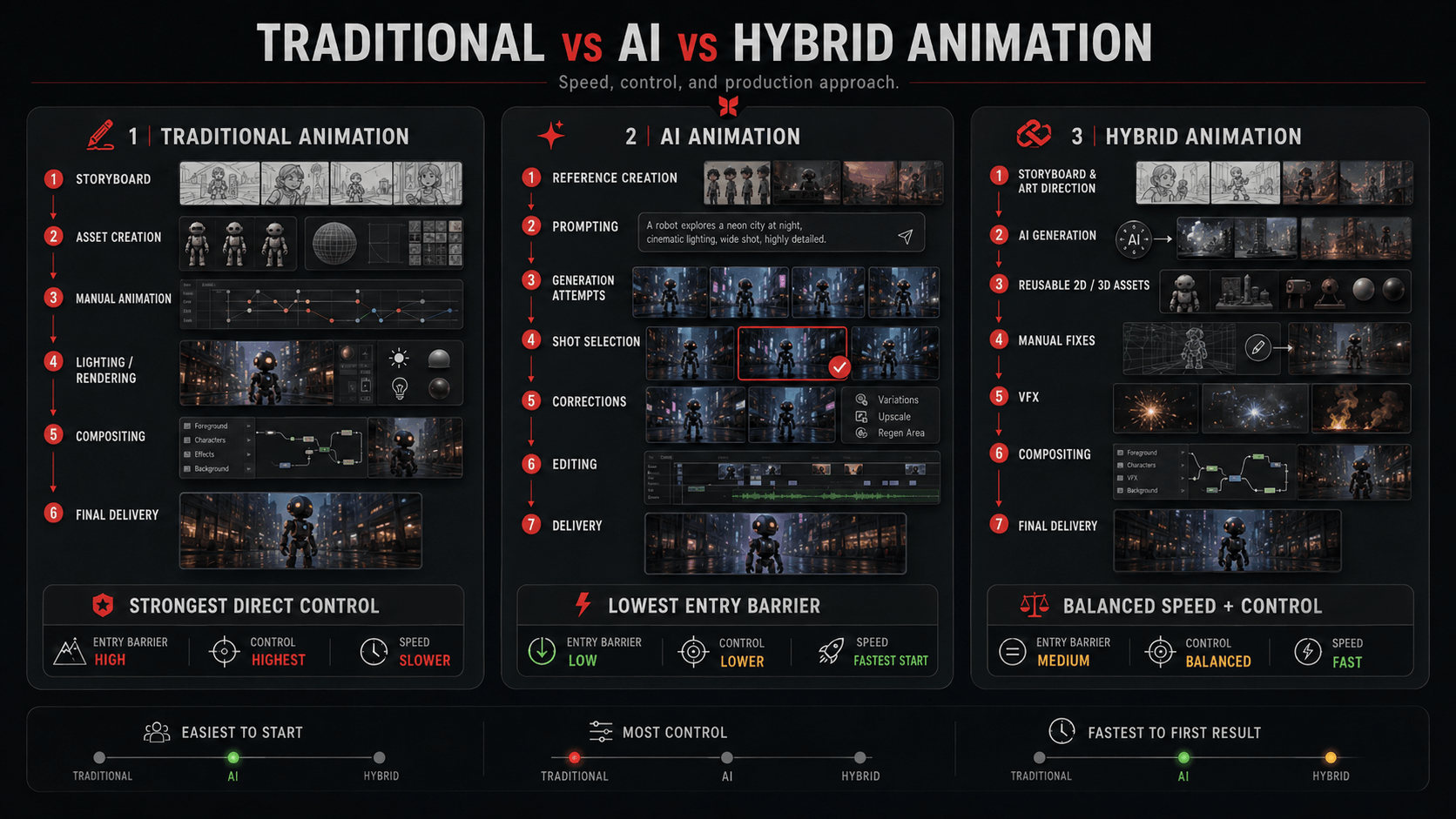
Buying credits for an AI video generator gives you raw generation capacity. A professional production may still require concept development, storyboarding, visual development, character design, multiple generations, editing, compositing, VFX, sound, revisions, and quality control.
This is why looking at the monthly price of Runway, Kaiber, or another AI platform does not tell you what an AI animation project will ultimately cost.
As a broad starting point:
| Type of AI Animation | Typical Budget Level |
| DIY experiments and simple loops | $10–$100 in monthly software costs |
| Frequent individual AI video production | $30–$200+ per month across tools and credits |
| Professionally produced short AI content | Usually thousands of dollars |
| Commercial or character-driven AI animation | Often reaches five-figure territory as complexity increases |
| Large hybrid AI, 2D, 3D, or VFX productions | Custom budget based on scope |
These are planning ranges rather than universal market rates. AI animation does not yet have a standardized price-per-minute model because two videos of identical length can require completely different amounts of work.
A 20-second surreal landscape might be generated from a handful of successful shots. A 20-second product commercial could require ten controlled shots, a consistent character, an accurate product, precise camera movements, typography, several revision rounds, sound design, and manual compositing.
The better question, therefore, is not simply “How much does AI animation cost?” It is what needs to happen between the original idea and the approved final video?
What Is AI Animation?
AI animation refers to workflows in which artificial intelligence generates or assists with some part of animated content production. That can mean anything from turning one still image into a five-second video to combining generative footage with conventional 2D animation, 3D CGI, compositing, or visual effects.
The distinction is important because AI animation is not a single technique. Different applications replace or accelerate different parts of an animation pipeline, which means their effect on cost also varies.
Read More: Guide to AI-Assisted Animation Services
Definition and Core Concepts
Modern generative systems analyse patterns learned from large quantities of visual and other training data and use those patterns to produce new outputs based on an input.
Depending on the tool, that input could be a text prompt, image, reference character, existing video, motion reference, first and last frames, or a combination of several inputs.
AI can now assist with tasks such as generating shots, animating still images, producing visual concepts, altering existing footage, creating lip sync, interpolating frames, generating backgrounds, and supporting post-production.
Its role extends well beyond text-to-video generation. There are already numerous applications of AI in animation throughout concept development, pre-production, animation, and post-production.
That broader definition matters financially. Sometimes AI saves money by generating footage. In other cases, its real value is simply reducing the amount of time an artist spends on a repetitive task.
Fully AI-Generated vs AI-Assisted Animation
A fully AI-generated video can begin with little more than prompts and reference images. This approach can be extremely affordable for experimentation, short social clips, mood pieces, and projects where minor inconsistencies are acceptable.
AI-assisted production is more controlled.
Artists may develop the storyboard conventionally, establish characters manually, generate selected shots with AI, build particular elements in 3D, correct footage in compositing software, and finish everything through a traditional editing pipeline.
This hybrid approach is particularly useful in professional production because generating an attractive shot is not the same thing as producing an animation that satisfies a brief.
Pixune’s AI animation services use this type of hybrid approach, combining generative techniques with creative direction and established animation, CGI, VFX, editing, and post-production methods when required.
If you want to see how the individual stages of an AI animated short can fit together, this workflow demonstration gives a practical example:
The important point for pricing is that AI may change how the work is produced without removing the need for the work itself.
7 Factors That Affect AI Animation Costs
Runtime certainly matters, but it is only one piece of an AI animation budget. Complexity, visual consistency, number of shots, revision requirements, quality expectations, software usage, and post-production can have an equal or greater effect.
Generative production also introduces another variable: not every generated result is usable. Several attempts may be required before one shot reaches the required quality.
1. Complexity of Characters, Scenes, and Actions
Simple motion is generally easier to produce than tightly directed action.
An abstract background slowly changing shape gives an AI model considerable room to interpret the prompt. A character picking up a particular product, opening it correctly, turning toward the camera, and delivering an exact expression leaves far less room for interpretation.
Every additional constraint can create more iteration.
The same applies to environments. A generic futuristic street can tolerate differences between generations. A recreation of an actual store interior, recognizable game environment, or branded production set cannot.
Crowds, multiple interacting characters, complex choreography, accurate products, unusual camera movements, and detailed environments can therefore increase both generation time and manual correction.
2. Length and Number of Shots
Longer animations normally cost more, but runtime alone can be misleading.
Imagine two 30-second projects.
One contains three long atmospheric shots.
The other contains 15 shots featuring the same character in several environments.
The second project introduces far more continuity, camera, movement, and generation problems despite having exactly the same runtime.
For AI animation, cost per shot can sometimes be a more useful measurement than cost per minute.
Longer productions also compound consistency issues because objects, environments, and characters established early in the animation must remain recognizable throughout later scenes.
3. Quality and Visual Style
“AI-generated” describes the production technique, not the visual standard.
Simple stylized content may tolerate small visual changes. A high-end product commercial, realistic cinematic sequence, or branded campaign usually cannot.
Realism can actually make errors more noticeable. Incorrect fingers, changing facial features, distorted typography, inconsistent product geometry, and physically impossible movements stand out immediately when everything else looks realistic.
Different cartoon styles also present different challenges. Anime-inspired animation, painterly visuals, realistic people, graphic 2D imagery, stylized 3D, and photorealistic cinematics require different approaches.
The cost comes from reaching the desired level of control, not merely selecting a style from a menu.
Read More: Can AI Improve or Hurt Animation Quality
4. Character and Visual Consistency
Consistency remains one of the most important cost factors in AI animation.
Creating one convincing character image is relatively easy. Keeping the exact character art style, same face, body proportions, clothing, hairstyle, accessories, and art direction across 20 shots is substantially harder.
The challenge grows when that character must appear from different angles, under different lighting conditions, while performing different actions.
Professional workflows may therefore involve character sheets, approved reference images, reusable source frames, image-to-video techniques, compositing, manual paint fixes, conventional animation, or even custom 3D assets.
The advantages and disadvantages of AI animation become particularly relevant here. Generative models can dramatically accelerate experimentation, but unpredictability and consistency problems can bring human artists back into the pipeline.
5. Revisions and Generation Attempts
Generative animation is probabilistic.
If an animator changes a conventional keyframe, the resulting change is relatively predictable. Changing an AI prompt or reference may correct one problem while unexpectedly introducing another.
Perhaps the hand improves, but the character’s face changes.
Perhaps the motion becomes better, but part of the background disappears.
Perhaps the composition is finally correct, but the product changes shape.
One approved five-second shot can therefore represent far more than five seconds of generated footage.
This makes revision management particularly important. Projects with clear approvals and locked creative decisions are usually much easier to budget than projects where the direction continues changing during production.
6. Software and Tools Used
The direct software cost of AI animation is usually much lower than the cost of professional creative labor.
Many platforms operate through monthly subscriptions, credits, GPU time, generation limits, or combinations of these systems. Pixune’s guide to AI animation tools provides a broader comparison of the platforms available to creators.
However, the advertised subscription is rarely the full software bill.
A production might use one system for concept images, another for video generation, another for voice, and conventional software for compositing and editing. Increasing resolution, generating longer clips, using premium models, or discarding unsuccessful results can consume additional credits.
This comparison of AI platforms is useful for seeing how dramatically the economics can change depending on the generator and plan being used:
The cost per generated second is worth knowing, but professionals should pay even more attention to cost per approved second.
If a creator spends $100 generating footage but only 20% of that footage survives the edit, the real useful generation cost is considerably higher than the advertised generation rate.
7. Editing, VFX, Sound, and Post-Production
An AI-generated shot is not automatically a finished production shot.
There may be unwanted objects to remove, edges to clean, logos to replace, timing to adjust, generations to combine, colors to match, or continuity mistakes to repair.
Then come the tasks that would exist regardless of how the footage was generated: editing, compositing, typography, voice-over, sound effects, music, color grading, subtitles, delivery formats, and final quality control.
Deloitte’s research into generative AI video and social production makes a useful distinction here. The technology can eliminate expensive micro-tasks, shorten production cycles, and allow smaller teams to produce more content, rather than necessarily replacing the complete production stack.
Pricing Models for AI Animation
AI animation appears to have confusing prices because people are often comparing different things.
A subscription sells access to software. A freelancer sells their time and expertise. A production studio sells a finished result involving several disciplines.
Understanding which pricing model you are looking at makes the numbers much easier to interpret.
1. Subscription-Based and Credit-Based Platforms
Subscription and credit systems are the most common options for DIY creators.
You purchase access to the platform and perform the production yourself. This keeps the financial barrier remarkably low and is one reason AI video has become attractive to independent creators.
The downside is that the creator absorbs the labor and the uncertainty.
A $30 subscription does not mean a video cost $30 if producing it required three days of work and hundreds of discarded generations.
2. Per-Minute or Per-Second Pricing
Per-minute pricing is familiar from conventional animation and can still provide a useful starting point.
For generative animation, however, it should never be considered in isolation.
One second containing a simple camera push through a landscape may be straightforward. One second involving an exact product interaction can take much longer to solve.
Studios therefore need to consider the number and complexity of shots alongside runtime.
3. Fixed Per-Project Pricing
A fixed project fee is often more practical for professional work.
The production company assesses the complete scope, concept development, storyboard, generation, animation, revisions, editing, sound, and delivery, and quotes the finished project.
For a client, this is much easier than trying to calculate GPU minutes or generation credits.
It also shifts attention toward the thing that actually matters: the final animation.
4. Custom AI Animation Services
Commercial work usually requires custom pricing because projects become too different for one rate card to remain accurate.
A 30-second AI music video, 30-second product commercial, and 30-second game cinematic may have identical runtimes while requiring entirely different teams and pipelines.
A useful explanation of this distinction between generation expenses and real professional AI-video costs can be seen here:
This is one of the main reasons extremely low AI-video price claims should be treated carefully. They may describe the cost of producing raw generations rather than the complete cost of producing a client-ready piece.
Typical AI Animation Cost Ranges
There is currently no reliable universal industry database showing an average price per minute of professional AI animation.
That is worth stating clearly.
The technology is developing rapidly, workflows differ between studios, and “AI animation” can refer to anything from a five-second image-to-video experiment to a full hybrid production involving artists, animators, compositors, and VFX specialists.
The ranges below should therefore be treated as practical budgeting categories rather than fixed market prices.
Simple AI-Generated Loops or Shorts
For DIY creators, direct costs can remain remarkably low.
Roughly $10–$100 in monthly software spending can be enough for occasional experiments, simple loops, image-to-video content, and short social posts, depending on the AI art generator tools and amount of generation required.
The reason this can be so inexpensive is that there is no separate production team. The creator performs the planning, prompting, selection, editing, and revisions personally.
The software expense is therefore low, but the labor has not disappeared. It has simply moved to the creator.
Frequent Individual AI Production
Creators working with AI regularly may spend $30–$200+ per month across generation services, additional credits, image tools, upscalers, voice software, editing applications, and other supporting services.
Heavy generation can push that figure higher.
This is where tracking cost per approved second becomes useful.
Suppose $150 worth of subscriptions and credits produces hundreds of seconds of generated material, but only 30 seconds reach the finished video. The relevant number is not how cheaply the machine produced raw frames. It is how much usable footage the investment ultimately produced.
Professional AI-Enhanced Animation
Once professionals are hired, budgets generally move beyond software prices and into hundreds or thousands of dollars because skilled labor becomes the larger component.
The U.S. Bureau of Labor Statistics reported a $99,800 median annual wage for special effects artists and animators in May 2024. That figure is not an animation studio rate, freelancers and studios have completely different operating costs, but it provides useful context for the economic value of professional animation labor. BLS publishes the full occupation and wage data here.
A professional AI project may involve an art director, AI artist, storyboard artist, animator, editor, compositor, sound designer, and production manager.
AI can reduce the hours required for certain stages. It does not make all those skills free.
This breakdown of the real production considerations behind AI anime is also worth watching because it illustrates how quickly a seemingly inexpensive generative workflow develops additional costs once it becomes an actual production:
Commercial and Branded AI Animation
Commercial projects tend to cost more because the margin for error becomes smaller.
The product must remain accurate. Brand colors matter. Logos cannot mutate. Characters must stay consistent. Several stakeholders may need to approve the work. The final animation might also require horizontal, vertical, square, cut-down, localized, and clean versions.
Professional AI commercials can therefore move from several thousand dollars into five-figure territory when substantial creative direction, character work, VFX, or post-production is required.
For comparison, conventional commercial animation costs already vary considerably according to technique, complexity, duration, and production value.
AI can reduce particular parts of that workload, but it cannot be assumed to reduce every stage equally.
Large-Scale and Hybrid AI Productions
At the upper end, the distinction between “AI animation” and “traditional animation” becomes increasingly blurred.
A large project might use generative AI for concept development and selected shots, Blender or Maya for products and environments, hand animation for characters, Houdini for effects, and After Effects or Nuke for compositing.
A production containing dozens or hundreds of shots, recurring characters, complex environments, VFX, 3D assets, voice production, music, and multiple delivery formats can comfortably reach five-figure budgets and beyond.
In these projects, AI may not exist primarily to make the work cheap. It may allow the same budget to produce something more ambitious.
AI Animation Cost vs Traditional Animation Cost
AI can reduce animation costs, but the phrase “AI is cheaper than traditional animation” needs context.
The savings come from specific tasks that can be shortened, automated, or removed. The greater the proportion of those tasks in a project, the larger the financial advantage may become.
Other parts of production remain difficult regardless of the tools being used.
Speed and Efficiency
One of AI’s clearest advantages is visual exploration.
Artists can test compositions, environments, art directions, lighting ideas, and visual concepts much faster than producing every option conventionally.
Research is beginning to put numbers behind some of these gains. McKinsey reported in January 2026 that media leaders experimenting with AI were seeing potential productivity improvements of 5–10% in specific production use cases, with much of the early value appearing in development and pre-production. McKinsey’s film and television production research also stresses that the long-term effect on complete production pipelines remains uncertain.
That is a meaningful efficiency gain.
It is very different from claiming that AI automatically makes every animation 80% or 90% cheaper.
Budget Savings Potential
Traditional animation relies heavily on skilled labor.
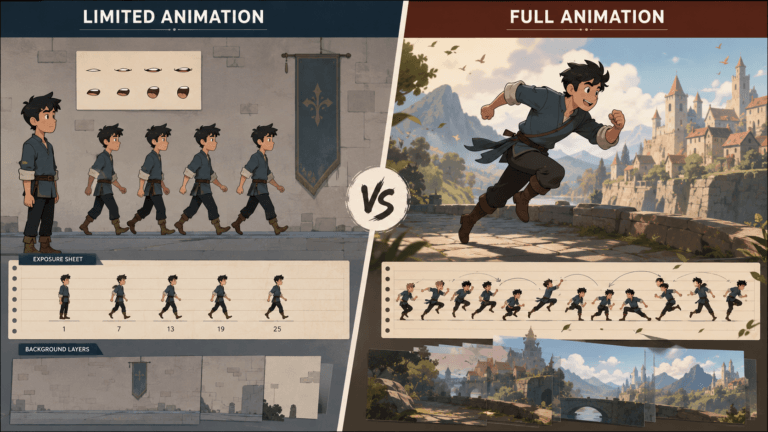
Pixune’s guide to 2D animation costs shows how dramatically budgets change between limited animation, motion graphics, commercial work, and detailed frame-by-frame production.
The same applies to 3D animation costs, where modelling, rigging, animation, simulation, lighting, rendering, and compositing can all contribute to the final budget.
AI may shorten some of these stages or remove the need for them in particular shots.
A background may not need to be modelled.
A concept frame might take minutes instead of hours.
Several visual directions can be tested before a team commits to production.
Those are real savings.
But they must be calculated according to the workflow rather than applied as an arbitrary percentage discount to traditional animation.
Quality Trade-Offs
Sometimes the cheapest production method on paper becomes expensive once you try to force it to perform a task for which it is poorly suited.
Consider an industrial animation where a component must be mechanically accurate.
A generative model might produce a visually impressive approximation quickly. Repeatedly trying to make every component dimensionally correct, however, could become much less efficient than building a proper 3D model.
The same applies to a recurring 2D character needed across dozens of episodes. A conventional rig or established model sheet may provide far more predictable long-term production.
This is why comparing 2D vs 3D animation cost is useful even in an AI discussion. The cheapest technique depends on what the production actually needs to accomplish.
Where Human Labor Still Matters
Animation involves more than generating moving images.
Someone still has to decide whether an expression works, whether the storytelling is clear, whether the edit drags, whether a shot communicates the right idea, and whether the final piece actually suits the audience and brand.
Adobe surveyed 2,541 creative professionals across multiple countries and found that 62% of generative-AI users said it was already reducing time spent on tasks by around 20%. At the same time, 58% reported producing more content. Adobe’s research on creative professionals and generative AI is a useful reminder that efficiency does not necessarily mean removing the creative professional from the process.
Saving an artist several hours can lower production costs considerably.
That is different from eliminating the artist.
How to Reduce AI Animation Costs
The easiest way to waste money on AI animation is to begin generating before making basic creative decisions.
A well-planned project usually requires fewer attempts, fewer corrections, and fewer late-stage revisions. Cost control therefore starts before a single final shot is generated.
1. Plan Before Generating
Define what the video is supposed to accomplish first.
The brief should establish the audience, message, duration, aspect ratio, visual direction, characters, products, major shots, and required deliverables.
Without those decisions, generation becomes an expensive form of brainstorming.
You may produce hundreds of visually interesting clips without moving closer to a finished video.
2. Storyboard Before Producing Final Shots
Storyboards remain valuable even when AI is doing much of the image generation.
They determine whether the sequence works before expensive production begins.
A storyboard establishes shot order, composition, timing, camera direction, character actions, and transitions. It also lets the team remove unnecessary shots before spending credits and artist hours trying to perfect them.
This principle is well established in the conventional 2D animation pipeline, and it transfers naturally into AI production.
3. Create Character and Style References Early
Approve your visual language before producing the final sequence.
A character reference should establish the face, hairstyle, body proportions, costume, colors, and important accessories.
For branded work, product references, packaging, logos, fonts, dimensions, and brand guidelines should also be supplied before generation begins.
Strong references do not guarantee perfect consistency, but they give the production team something objective to match against.
4. Reuse AI Models and Approved Assets
Not everything needs to be regenerated.
A successful background can become a reusable source asset. An approved character image can be carried into subsequent shots. Existing 3D models can preserve product accuracy. A successful generated frame can become the starting reference for another sequence.
Professional animation pipelines have always relied on asset reuse because rebuilding approved work wastes time.
AI does not change that principle.
5. Choose the Right Tool for the Job
The cheapest AI tool is not necessarily the cheapest production solution.
A model that performs poorly at the type of movement you need may burn through generations while a more expensive model solves the shot quickly.
Sometimes the best AI tool is no AI tool at all.
A logo replacement might take five minutes in compositing software.
An exact product rotation may be easier in 3D.
A character performance may be more controllable with a conventional rig.
The most efficient studios are likely to use AI selectively rather than trying to force every shot through the same generator.
6. Control Revision Cycles
Set approval stages early.
A sensible sequence might be:
Concept → Style Frames → Storyboard → Test Shots → Final Generation → Edit → Finishing.
Once one stage has been approved, major changes to it should be treated differently from normal corrections.
If a character redesign happens after 25 shots have already been generated, AI does not magically remove the cost of rebuilding them.
Is AI Animation Worth the Cost?
AI animation offers its strongest economic advantages when a project benefits from experimentation, variation, speed, or access to visuals that would otherwise require expensive production resources.
Short-form marketing is a good example. A brand may need many variations for different platforms rather than one heavily polished master video.
Concept films, previsualization, pitch videos, experimental advertising, surreal music videos, social campaigns, and rapid creative testing can also benefit substantially.
AI becomes less automatically attractive when absolute precision dominates the brief.
Technically accurate industrial animation, long-form recurring characters, tightly controlled product demonstrations, and projects designed around reusable assets may still benefit heavily from traditional 2D or 3D pipelines.
The practical answer is often not “AI or traditional animation.”
It is deciding which parts of the project AI should handle and which parts it should not.
Future Trends in AI Animation Pricing
The underlying cost of AI generation is likely to continue falling as models and computing infrastructure improve, but that does not necessarily mean professional animation prices will collapse at the same rate.
Production economics depend on both the cost of the tools and the quality audiences expect from the people using them.
Advances in AI Are Lowering Technical Costs
The broader AI industry has already demonstrated how rapidly underlying computing costs can decline.
Stanford’s 2025 AI Index Report found that the inference cost of a system performing at roughly GPT-3.5 level fell more than 280-fold between November 2022 and October 2024. The report also notes annual hardware cost declines of around 30% and substantial improvements in energy efficiency.
Video generation has its own computational demands, so those figures cannot simply be applied directly to AI animation pricing.
They do, however, show the wider direction of travel: capable AI systems are becoming cheaper and more accessible.
Democratization Will Lower the Entry Barrier
As generating technically impressive video becomes easier, more individuals and small studios will be able to enter the market.
Deloitte expects generative video to empower independent creators particularly strongly in short-form and social video, where shorter shots and rapid experimentation align well with current model capabilities.
This should continue lowering the minimum amount of money required to make something that looks impressive.
The more interesting question is what happens after that becomes normal.
Better AI May Increase Quality Expectations
If almost anyone can create an attractive five-second clip, an attractive five-second clip stops being particularly valuable on its own.
Clients and audiences begin expecting better storytelling, stronger art direction, recognizable characters, more complex sequences, higher consistency, stronger sound, and more distinctive ideas.
Some of the money saved in generation may therefore move elsewhere in production.
This is already part of the wider way AI is transforming animation. The technology is changing where creative teams spend their time rather than simply making every existing responsibility disappear.
Hybrid Production Is Likely to Become Normal
The line separating AI animation from traditional animation will probably become less important over time.
A project may use generative AI during visual development, 3D for a product, conventional animation for a hero character, AI for selected backgrounds, and VFX software to bring everything together.
From the client’s perspective, the production technique becomes secondary.
The relevant question is whether the combination delivers the required quality within the available schedule and budget.
Conclusion
So, how much does AI animation cost?
At the lowest end, someone can experiment with generative animation for a few tens of dollars per month. Frequent creators may spend $100–$200 or more across several subscriptions and credit systems.
Professional production is different.
Once the project requires creative direction, storyboards, consistent characters, controlled shots, revisions, manual animation, editing, VFX, sound, and commercial-quality delivery, budgets can move into thousands or tens of thousands of dollars.
Those figures are not contradictory.
Cheap AI generation and professional AI animation are two different things.
The most useful way to budget a project is therefore to stop asking what the AI tool costs and start examining the complete production.
How many shots are required? How difficult are they? Does the same character need to remain consistent? How accurate must the product be? How much manual correction is acceptable? How many people need to approve the work? How much conventional animation and post-production will still be necessary?
Those questions will tell you far more about the final AI animation cost than the monthly price displayed on any generative platform.



![1405,02,10 SnpLE[Cover HD] 1](https://pixune.com/wp-content/uploads/2026/08/14050210-SnpLECover-HD-1-768x431.jpg)