
Artificial intelligence is changing how animation is created. From generating concept art and environments to producing motion from video and automating repetitive technical tasks, AI is already becoming part of professional animation workflows.
This naturally raises an important question: will AI replace animators?
The answer is more nuanced than a simple yes or no. AI can automate parts of animation production, and some tasks that once required substantial manual work are becoming faster. At the same time, animation involves much more than producing frames. Storytelling, acting, visual direction, character performance, timing, composition, and artistic judgment all require decisions that cannot be reduced to a single automated process.
The industry is therefore moving toward a model in which AI increasingly handles certain repetitive or technical tasks while human artists direct, refine, and make creative decisions.
This article explores how AI is changing animation, what it can automate, what remains dependent on human artists, and how animators can adapt to increasingly AI-assisted production.
How AI Is Changing the Animation Industry
AI is not entering animation as one single technology. Different AI systems are being applied to different parts of the production pipeline.
Some tools generate motion from video or a small number of keyframes. Others assist with rigging, rendering, compositing, backgrounds, facial animation, or previsualization.
For example, Autodesk’s current animation tools include AI-assisted MotionMaker, which can generate character motion from keyframes or motion paths, while Flow Studio can convert live-action footage into editable CG scenes with elements such as motion capture, camera tracking, and character animation.
This distinction matters. AI animation is increasingly about augmenting existing production workflows, not necessarily generating an entire finished film from a single prompt.
AI-Assisted Animation Tools
Modern AI animation tools can assist artists with specific production tasks.
Motion-generation systems can provide a starting point for character movement. AI-powered motion capture can extract movement from video without requiring the same traditional capture setup. Other systems can assist with facial animation, lip synchronization, camera tracking, compositing, and technical optimization.
For example, Autodesk’s MotionMaker uses machine learning to generate character motion from inputs such as keyframes and motion paths, after which animators can refine the result.
The important difference is control. A production-oriented AI tool that produces an editable result can fit into an animation pipeline much more easily than a system that generates a finished video that cannot be meaningfully modified.
Faster Concept Development and Pre-Production
AI can significantly accelerate the early stages of an animation project. Artists can use generative tools to explore possible:
- Character designs
- Environments
- Color palettes
- Camera compositions
- Storyboards
- Visual styles
- Cinematic concepts
Instead of spending substantial time fully developing every possibility, a team can rapidly explore different directions and select the strongest one for further development.
This does not eliminate the need for concept artists or directors. It changes where their time is spent. Rather than manually producing every exploratory image, artists can spend more time evaluating ideas, establishing a visual language, and developing the chosen direction.
Automated Tasks in Animation Pipelines
Many animation tasks are repetitive rather than fundamentally creative. AI can assist with tasks such as:
- Motion extraction
- Rigging
- Rotoscoping
- Lip synchronization
- Camera tracking
- Facial tracking
- Background generation
- Image upscaling
- Frame interpolation
- Certain compositing operations
Autodesk, for example, currently uses AI for motion generation, character deformation, video-to-3D scene conversion, camera tracking, and several VFX and finishing operations.
The practical effect is that animators may spend less time on technical preparation and repetitive work and more time refining the actual performance.
What Parts of Animation Can AI Automate?
AI is most effective when the task has recognizable patterns, can be learned from existing data, and does not require a completely new creative decision for every frame. That makes certain parts of the animation pipeline particularly suitable for automation.
Generating Backgrounds and Assets
Generative AI can create visual concepts for environments, props, textures, and other supporting assets. A production team might use AI to explore a futuristic city, fantasy landscape, industrial environment, or background illustration before creating the final production assets. AI-generated material can also serve as temporary content during previsualization.
However, production assets often require additional work. A generated image may have inconsistent perspective, unusable geometry, incorrect details, or a visual style that does not match the rest of the project. For this reason, AI-generated assets are often starting points rather than finished production assets.
Motion Capture Enhancement
AI can make motion capture more accessible by extracting movement from video. Modern systems can analyze footage and derive body movement, camera information, and other data that can be transferred to digital characters.
Autodesk Flow Studio, for example, can convert video into editable CG scenes and generate motion capture, camera tracking, character passes, and related outputs. This can reduce the amount of manual setup required before an animator begins refining a performance. It does not mean the resulting motion is automatically final. Cleanup, retargeting, timing adjustments, foot contact, weight, and acting choices may still require an animator.
Inbetweening and Frame Generation
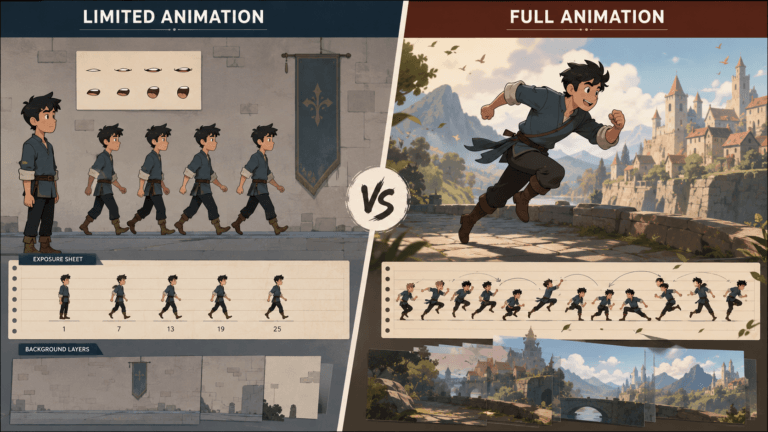
Traditional 2D animation often requires artists to create key poses and intermediate frames between them. AI can assist with generating these intermediate frames, making certain types of animation faster.
Frame-generation and interpolation technologies can also create additional frames for slow-motion footage and other visual effects applications. Autodesk, for example, currently lists AI-powered timewarp and frame-generation capabilities among its VFX tools.
The challenge is maintaining the animator’s intended timing and movement. More frames do not automatically mean better animation.
Rendering and Technical Optimization
AI can also assist with technical aspects of production. Examples include:
- Resolution enhancement
- Character deformation
- Image processing
- Scene optimization
- Denoising
- Compositing assistance
These processes can reduce technical bottlenecks and allow artists to iterate more quickly. For example, machine-learning-based deformation can approximate complex character behavior more efficiently, making interactive posing and playback faster.
What AI Cannot Replace in Animation
The areas where AI currently has the greatest limitations are often the areas that make animation feel intentional. Animation is not simply movement. It is performance designed through movement.
Creative Direction and Storytelling
Someone still needs to decide what the animation is about. An animation director or creative team determines:
- What the audience should feel
- Which moments are important
- How the story progresses
- What visual style communicates the idea
- Where the camera should be
- Which performance supports the story
AI can generate possibilities, but selecting and shaping those possibilities into a coherent story requires creative judgment. A technically impressive sequence can still be ineffective if it has no clear narrative purpose.
Character Acting and Emotional Performance
Character animation is particularly dependent on subtle decisions. A character’s performance can change through:
- Timing
- Eye direction
- Facial expression
- Posture
- Weight shifts
- Pauses
- Gesture
- Breathing
- Anticipation
A character looking at another character is not enough. The animator must decide how they look, why they look, and what the audience should understand from that action. AI can generate useful motion starting points, but an animator can still be needed to shape a performance around the specific story and character.
Artistic Decision-Making
Every animation project contains thousands of visual decisions. Should a character move quickly or slowly? Should a camera remain still or move? Should a shadow be hard or soft? Should a pose be realistic or exaggerated? These choices create the project’s visual language. AI can offer options, but a human artist or director needs to establish which options are appropriate for the project.
AI vs Human Animators: Different Strengths
The relationship between AI and animators is better understood as a difference in strengths rather than a simple competition.
Speed and Efficiency of AI
AI’s strongest advantage is speed. It can process large amounts of information and automate repetitive operations quickly. For production teams working under tight deadlines, these improvements can be significant.
This can allow teams to:
- Produce initial motion faster
- Explore more concepts
- Generate variations
- Reduce manual technical work
- Iterate more quickly
Creativity and Control of Human Artists
Human artists provide something different: intentional control. An animator does not simply create movement. They decide what movement means.
Artists can deliberately break realistic physics, exaggerate timing, hold a pose longer than expected, or introduce an unusual movement because it supports the character or story. This is particularly important in stylized animation, where realism is often less important than clarity and personality.
The Rise of Hybrid Animation Workflows
The most practical direction is increasingly hybrid. An animator might use AI to generate a first pass of a walk cycle, then manually adjust the hips, feet, timing, poses, and facial performance. A studio might use AI to generate concept environments, then have environment artists rebuild the chosen design as production-ready 3D assets. A live-action performance could be converted into digital motion through AI and then refined by an animator.
This approach combines automation with artistic control. Autodesk explicitly describes its newer AI animation systems around this model: AI handles parts of the workflow while artists retain the ability to edit and refine the result.
How Animators Can Adapt to AI
The arrival of AI does not make animation skills irrelevant. It changes which skills become most valuable.
Learning AI-Assisted Tools
Animators should become comfortable experimenting with AI tools that are relevant to their specialization. For a 3D animator, this might include AI-assisted motion generation, mocap processing, rigging, and scene tools. For a 2D animator, useful applications may include frame generation, rotoscoping, cleanup, concept development, and asset exploration. The goal is not to use AI for everything. It is to understand where it can make a workflow faster without reducing quality.
Focusing on High-Value Creative Skills
As repetitive tasks become easier to automate, creative skills can become more important. These skills help artists make better decisions regardless of which software they use.
Animators can invest more deeply in:
- Acting
- Timing
- Storytelling
- Character development
- Composition
- Cinematography
- Visual design
- Art direction
Becoming an AI-Enhanced Animator
An AI-enhanced animator understands both traditional animation principles and modern production technology. Instead of competing with AI on tasks that machines perform efficiently, the animator uses AI to increase their own capabilities.
For example, an artist who previously completed one difficult animation sequence in a day might use AI to create a strong base motion in minutes and spend the remaining time refining the performance. The animator’s value shifts from simply producing every element manually toward directing, correcting, refining, and improving the final result.
The Future of Animation Jobs
AI will likely change animation jobs even if it does not eliminate the profession as a whole. Some existing tasks may require fewer hours, while new responsibilities will emerge around AI-assisted production.
New Roles Created by AI
As AI becomes part of animation pipelines, studios may need people who understand both creative production and AI systems. Potential roles and specializations in an AI animation studio include:
- AI animation specialist
- AI pipeline artist
- Generative animation director
- AI technical artist
- AI workflow designer
- Virtual production specialist
- AI-assisted previs artist
Some of these roles may evolve into existing positions rather than becoming completely separate professions. The broader trend is toward artists who can combine domain expertise with new production technology.
Changing Production Pipelines
Traditional production pipelines divide work into stages such as concept development, modelling, rigging, animation, lighting, rendering, compositing, and editing. AI can shorten or connect some of these stages.
For example, video can now be used as a starting point for generating editable 3D animation data, reducing some of the manual work between live performance and digital animation. As these art generator tools improve, production pipelines may become less linear and more iterative. Artists could move more quickly between concept, previs, animation, and final production.
Human Artists in AI-Powered Studios
AI-powered studios will still need people who understand visual storytelling and production quality. Someone needs to establish the project’s art direction, evaluate generated results, maintain consistency, communicate creative decisions, and determine when an AI-generated result is good enough or when it needs to be rebuilt manually. In other words, AI may change the tools inside the studio without eliminating the need for creative leadership.
Will AI Replace Animators Completely?
The answer depends on what is meant by “replace.” AI can already replace or reduce the amount of human labor required for specific animation tasks. It can generate motion, automate technical processes, create visual material, and accelerate repetitive work. That is different from replacing the entire role of an animator.
Short-Term Industry Impact
In the near term, AI is likely to affect animation primarily through workflow changes. Some repetitive tasks will become faster. Some production roles may change. Teams may be able to accomplish more work with fewer manual steps. This could change the demand for certain types of entry-level or highly repetitive production work.
At the same time, animators who can use AI effectively may be able to take on more ambitious projects or produce more content within the same amount of time. The effect will not necessarily be identical across all studios, countries, production types, or specialties.
Long-Term Possibilities
Long-term outcomes are much harder to predict. AI models may eventually become considerably better at maintaining character consistency, following detailed direction, understanding cinematography, and producing editable animation.
If that happens, the boundary between “AI tool” and “animation software” could become increasingly difficult to define. Some tasks currently performed by animators may eventually become highly automated.
However, animation is a creative discipline, and the demand for stories, characters, performances, visual worlds, and entertainment does not disappear simply because production becomes more automated.
The jobs themselves may change substantially even if the broader need for animation services remains.
Why Human Creativity Remains Essential
The most important distinction is between creating an output and deciding what should be created. AI can generate a character walking across a room. A human artist decides:
- Why is the character walking?
- What are they feeling?
- What happened immediately before the scene?
- Why does the character pause?
- Where should the audience look?
- What should the movement communicate?
Those decisions turn animation into storytelling. As AI becomes better at generating content, the ability to make strong creative decisions may become more, not less valuable.
Conclusion
AI is already changing animation, but the more useful question is not whether AI will replace animators. It is which parts of an animator’s job will change, and which skills will become more valuable as the technology improves.
AI can automate repetitive work, accelerate pre-production, generate motion, assist with technical processes, and help artists explore ideas faster. Professional tools are increasingly being designed around this model, with editable and controllable AI outputs rather than purely automated black-box results.
For animators, the practical response is to learn how these tools work while continuing to develop the fundamentals that make animation effective: storytelling, acting, timing, visual composition, character development, and artistic judgment.
The future of animation is therefore unlikely to be simply AI versus animators. A more realistic direction is animators using AI with artists directing the creative process and AI handling an increasing share of the repetitive and technical work.


![1405,02,10 SnpLE[Cover HD] 1](https://pixune.com/wp-content/uploads/2026/08/14050210-SnpLECover-HD-1-768x431.jpg)