Retopology is often introduced as the process of creating a cleaner, lighter version of a high-poly 3D model. That explanation is not wrong, but it is incomplete.
In real production, retopology is not just about reducing polygon count. It is about converting a visually approved surface into geometry that can actually survive the rest of the pipeline.
A creature sculpt can look perfect in ZBrush. A jacket can simulate beautifully in Marvelous Designer or Houdini. A photogrammetry scan can capture real-world surface detail with impressive accuracy. But if the geometry underneath is chaotic, stretched, triangulated, or directionless, the asset may fail the moment it reaches rigging, UV mapping, deformation, texturing, rendering, or real-time playback.
That is where retopology becomes necessary.
Retopology rebuilds the surface of a model with cleaner polygon flow, controlled density, and production-aware structure. It turns sculptural, scanned, simulated, or procedurally generated geometry into a usable production mesh.
If you want to understand where this fits in the wider asset workflow, it helps to first understand the difference between 3D modeling and sculpting. Retopology usually appears when a model’s visual form is approved, but the geometry is not yet suitable for animation, games, or VFX production.
What is Retopology in 3D Modeling?
Retopology is the process of rebuilding the polygon structure of a 3D model while preserving its overall shape.
The original mesh may be a high-poly sculpt, a scan, a simulated cloth mesh, a boolean model, or a procedurally generated object. The retopologized mesh is a new version of that surface, designed with better edge flow, cleaner deformation behavior, more controlled polygon density, and stronger compatibility with downstream production stages.
The important point is this:
Retopology services do not exist because the model looks bad.
It exists because the model may not work properly.
A sculpt can have beautiful forms but terrible topology. A cloth simulation can move correctly but produce stretched render geometry. A scan can capture detail but contain thousands of irregular triangles. These surfaces may be visually useful, but they are not always production-ready.
The Difference Between Surface Quality and Topology Quality
In production, there is a major difference between the visible surface and the technical mesh underneath it.
A model may have strong anatomy, clean proportions, appealing shapes, and detailed sculpting, but still have unusable topology. That becomes a problem because riggers, animators, texture artists, VFX artists, and rendering teams do not only work with the surface. They work with how the surface is structured.
A production mesh needs to deform, subdivide, unwrap, bake, shade, and render predictably.
Retopology is the stage where that structure is created.
Why Retopology Exists in Production Pipelines
Retopology exists because many modern 3D workflows intentionally ignore clean topology during the creative phase.
This is not a mistake. It is part of the workflow.
During early modeling or sculpting, artists often need freedom. They need to explore forms, change proportions, add details, merge shapes, carve surfaces, and test ideas quickly. For that stage, clean topology can actually slow the process down.
That is why tools like ZBrush are so powerful. A sculptor can use Dynamesh, remeshing, subdivision, and sculpting brushes to develop complex organic forms without constantly worrying about edge loops and polygon flow.
But once the design is approved, the question changes.
The question is no longer, “Does this look good?”
The question becomes, “Can this asset move through production without breaking?”
When a Model May Not Need Retopology
Not every model needs retopology.
If an artist builds a model with a clean low-poly or subdivision-aware workflow from the beginning, retopology may not be necessary at all. For example, a hard-surface prop modeled carefully in Maya or Blender may already have controlled loops, clean bevels, proper support edges, and predictable subdivision behavior.
In that case, the topology is part of the modeling process from the start.
This is common in certain 3D modeling techniques, especially when the artist is building with production geometry in mind from the first blockout.
When Retopology Becomes Necessary
Retopology becomes necessary when the geometry no longer supports the next stage of production.
This often happens after sculpting, scanning, cloth simulation, boolean modeling, voxel remeshing, procedural damage, or destruction effects. These methods can generate great visual results, but they usually do not create topology that is suitable for deformation, UVs, shading, or real-time optimization.
A simple way to think about it is this:
| Workflow Result | Why Retopology May Be Needed |
| ZBrush sculpt | Great form, but topology is often too dense or directionless |
| Photogrammetry scan | Realistic surface, but irregular triangulated geometry |
| Cloth simulation | Good motion, but stretched or unstable render mesh |
| Boolean model | Strong shapes, but messy intersections and broken edge flow |
| Destruction sim | Useful fractured result, but chaotic topology |
| Decimated mesh | Lower polygon count, but poor deformation structure |
Retopology is the process of turning those surfaces into something the rest of the pipeline can trust.
Sculpt Geometry vs Production Geometry
One of the most important lessons in retopology is that sculpt geometry and production geometry are not the same thing.
Sculpt geometry is made for visual exploration.
Production geometry is made for technical behavior.
When an artist sculpts a character, creature, or prop, the goal is to define shape, silhouette, anatomy, wrinkles, folds, damage, and surface detail. The mesh can be extremely dense because the sculpting stage is mainly concerned with form.
But production geometry has to do more than hold form. It has to work.
It may need to deform under a skeleton, support facial expressions, unwrap cleanly for texturing, receive baked normal maps, subdivide at render time, interact with simulations, or run efficiently inside a game engine.
This is why a model can look finished artistically while still being unfinished technically.
Why High-Poly Does Not Mean Production-Ready
A common beginner mistake is assuming that high detail means high quality.
In production, that is not always true.
A high-poly sculpt may contain millions of polygons, but those polygons might not follow any useful direction. They may be evenly distributed for sculpting, but not organized for animation. They may describe the shape well, but they do not tell the surface how to bend.
A production mesh is usually much lighter than the sculpt, but more intelligent in structure.
The high-poly sculpt provides the visual information. The retopologized mesh provides the functional structure. Later, the high-poly detail can be transferred back through normal maps, displacement maps, curvature maps, ambient occlusion, and texture projection.
This is one reason retopology is closely connected to 3D digital sculpting. Sculpting creates the form; retopology converts that form into usable geometry.
What Makes Good Retopology?
Good retopology is not just clean wireframes.
A clean wireframe can still fail if it does not support the asset’s purpose.
Good retopology is topology that behaves correctly. It supports the way the asset needs to move, render, shade, unwrap, and interact with the rest of the pipeline.
For a static background prop, good topology may mean efficient polygon distribution and clean shading. For a hero creature, it may mean carefully designed deformation loops around shoulders, elbows, hips, eyes, and mouth. For a game asset, it may mean preserving silhouette while reducing runtime cost. For cloth FX, it may mean creating render geometry that can inherit simulation movement without producing shading artifacts.
Edge Flow: The Direction of Deformation
Edge flow is one of the most important parts of retopology.
In simple terms, edge flow is the way polygon loops travel across the surface of a model. In a production mesh, those loops should usually follow the direction of movement, compression, stretching, or form transition.
This matters because deformation travels through topology.
When an elbow bends, the mesh compresses on the inside and stretches on the outside. When a character smiles, the mouth corners pull, the cheeks lift, the lips compress, and the surrounding skin changes shape. If the topology does not support those movements, the model will pinch, collapse, or stretch unnaturally.
This is why facial topology often uses circular loops around the eyes and mouth. Those loops are not decorative. They exist because the face deforms in curved, layered patterns.
The same logic applies to body topology. Shoulders, hips, knees, elbows, fingers, and neck areas need topology that understands rotation and volume preservation.
Why Shoulders Are Difficult
The shoulder is one of the best examples of why retopology is technical, not just visual.
A shoulder is not a simple hinge. When the arm moves, several anatomical regions affect the surface at the same time. The clavicle lifts, the scapula shifts, the deltoid stretches, and the upper arm rotates. If the topology is too simple or flows in the wrong direction, the mesh will usually collapse during animation.
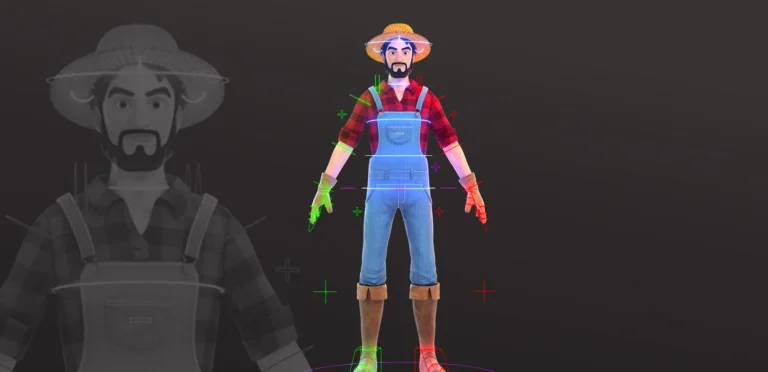
A bad shoulder may look acceptable in a T-pose. Once the arm lifts, the silhouette caves in, the skin twists, and the surface begins to pinch.
This is where topology quality becomes visible.
Not in the still model.
In motion.
Why Facial Topology Needs Special Attention
Facial topology is even more sensitive because expressions involve many small deformation zones working together.
The mouth must open, close, smile, stretch, compress, and support lip sync. The eyelids must blink and follow the eyeball. The cheeks need to lift and compress. The brow area needs to support emotional expression.
If the topology is wrong, the face may still look good in a neutral pose, but expressions will feel broken. Smiles may look stiff. Eyelids may collapse. Lip corners may tear or pinch. Blendshapes may become harder to sculpt and maintain.
This is why clean topology is so important for rigging in 3D animation. A rig can only perform well if the mesh gives it the right structure to deform.
Why Quads, Poles, and Triangles Matter
Retopology discussions often mention quads, triangles, and poles, but these terms are sometimes explained too rigidly.
The rule is not simply “quads are good and triangles are bad.”
The real issue is predictability.
Quad Topology and Subdivision
Quad-based topology is preferred in many production workflows because it subdivides and deforms more predictably. Subdivision algorithms such as Catmull-Clark work especially well with quad layouts. The surface smooths more evenly, loops are easier to control, and deformation tends to be more stable.
This is why character topology, facial topology, and animation-ready meshes are usually built mostly with quads.
However, games often use triangulated meshes at export or runtime. That does not mean quads are irrelevant. Artists still build with quads during production because quads make the mesh easier to edit, unwrap, skin, subdivide, and bake before final export.
Triangles Are Not Always Wrong
Triangles are not automatically bad.
A triangle on a flat, static, non-deforming area may never cause a problem. In many optimized game assets, triangles are completely normal.
The danger comes when triangles appear in deformation-heavy areas. A triangle redirects the flow of the mesh. Around a shoulder, mouth corner, eyelid, or elbow, that redirection can create pinching or shading artifacts.
So the question is not, “Does this mesh contain triangles?”
The better question is, “Are the triangles placed where they will not damage deformation or shading?”
Poles Are About Placement
A pole is a vertex where an unusual number of edges meet. Poles are unavoidable in real topology. They help redirect edge flow and resolve loops.
The problem is not the existence of poles. The problem is bad pole placement.
A pole placed in a calm area of the model may be completely harmless. A pole placed near the corner of the mouth, the eyelid, or the shoulder can create visible deformation problems.
Good retopology is the art of placing these compromises where they will cause the least damage.
Retopology for Games, Animation, and VFX
Retopology changes depending on the final use of the asset.
A mesh for a mobile game, a cinematic creature, a facial rig, and an FX simulation may all need different topology decisions. The principles overlap, but the priorities are not identical.
Retopology for Game Assets
In game production, retopology is often about balancing shape quality with runtime performance.
The mesh needs to preserve the silhouette and important forms while reducing unnecessary geometry. The high-poly sculpt may contain all the detail, but the game mesh usually carries only the geometry needed for shape and deformation. Surface detail is then transferred through baked maps.
This is where normal map baking becomes critical. If the retopologized mesh does not match the high-poly form well enough, the bake may show waviness, gradients, skewing, or projection errors.
Modern engines have changed some optimization rules, especially for static meshes, but clean topology is still important for characters, facial rigs, cloth, gameplay animation, and any asset that deforms.
Read More: High-Poly to Low-Poly Workflow in Game Art
Retopology for Animation
In animation, topology is mostly judged by deformation quality.
A character mesh may go through thousands of poses during production. Even small topology problems can become serious when animators push the rig into extreme poses.
For animation, retopology must support skinning, corrective shapes, facial expressions, muscle systems, and repeated revisions. This usually means more careful loop planning around joints and expression areas.
The mesh does not just need to look good once.
It needs to keep looking good while changing shape.
Retopology for VFX and Simulation
In VFX, retopology often becomes part of a larger technical workflow.
The simulation mesh and render mesh may be different. This is very common in cloth, muscles, destruction, creature FX, and scan cleanup.
A simulation mesh is often built for solving behavior. A render mesh is built for visual quality, UV stability, shading continuity, and subdivision.
Those two requirements can conflict.
That is why VFX pipelines often use retopology together with deformation transfer methods.
How FX Geometry Transfers onto Retopologized Meshes
This is one of the most important technical ideas in VFX retopology.
In many FX workflows, artists do not render the raw simulation mesh. Instead, they simulate with one mesh, retopologize a cleaner version, and then transfer the simulated deformation onto the clean mesh.
The simulation provides motion.
The retopologized mesh provides render quality.
A simplified version of the workflow looks like this:
Sculpt, scan, or simulation mesh
↓
FX simulation or deformation
↓
Chaotic animated geometry
↓
Clean retopologized mesh
↓
Wrap, point deform, or surface transfer
↓
Final renderable animated mesh
Why the Sim Mesh and Render Mesh Are Separated
A cloth simulation may generate motion that looks physically believable, but the mesh itself may not be suitable for rendering. It may contain stretched triangles, uneven polygon density, unstable UVs, or folds that shade poorly.
Instead of forcing that raw mesh through lookdev and rendering, the artist can create a cleaner retopologized garment.
Then the clean garment is made to follow the simulated version.
In Houdini, this can happen through point deform workflows or similar deformation transfer setups. In Maya, wrap deformers can be used in comparable ways. Other pipelines may use barycentric projection, surface constraints, or custom interpolation systems.
The goal is always similar: preserve the motion from the simulation while rendering a cleaner mesh.
Why Wrapping Matters in Production
Wrapping allows the production team to separate two problems that should not always be solved by the same mesh.
The simulation mesh answers the question:
“How should this move?”
The render mesh answers the question:
“How should this look?”
This separation is extremely useful. It allows cloth, creature skin, muscles, facial surfaces, or damaged geometry to inherit complex deformation while keeping clean UVs, stable displacement, predictable subdivision, and better shading.
This is why retopology in VFX is not just a modeling cleanup step. It is a bridge between simulation and final rendering.
Retopology and Texturing
Retopology also has a major impact on UV mapping, baking, and texturing.
A poorly retopologized mesh usually creates problems before the texture artist even starts painting.
If polygon density is uneven, UV layout becomes harder to control. If loops do not follow the form, seams may become more visible. If the low-poly mesh does not capture the high-poly silhouette accurately, normal baking may produce artifacts.
This is why retopology is closely connected to 3D texturing. Texture quality depends not only on the maps themselves, but also on the mesh receiving those maps.
Normal Map Baking and Projection Errors
In a high-to-low workflow, the high-poly mesh provides the detail and the retopologized mesh receives that detail through baking.
If the retopo mesh is too far from the sculpt, the bake may miss details or project them incorrectly. If the topology is uneven, gradients may appear. If hard edges and UV seams are not managed carefully, the asset may show visible shading errors.
Good retopology creates a stable target for baking.
That means the low-poly or mid-poly mesh should preserve the important silhouette, support clean UVs, and give the baking process a predictable surface.
Read More: Low-Poly vs. High-Poly Modeling
Manual Retopology vs Automatic Retopology
Automatic retopology tools have become much better, and they are useful in many workflows.
3D tools such as ZRemesher, Blender’s retopology tools, Houdini remeshing systems, and other auto-retopo solutions can create usable results for concept models, static assets, background props, and early production tests.
But automatic retopology still has a major limitation.
It does not fully understand intent.
What Automatic Retopology Does Well
Automatic retopology is useful when speed matters more than perfect control. It can quickly reduce density, create a more even mesh, and make a sculpt easier to handle.
For early design stages, that can be very helpful.
A concept artist may use automatic retopology to clean a sculpt enough for presentation. A modeler may use it as a starting point. An FX artist may use remeshing to prepare geometry for certain procedural operations.
Where Automatic Retopology Fails
Automatic systems can analyze curvature, but they do not truly understand production behavior.
They do not understand that a shoulder needs to preserve volume during arm rotation. They do not understand how facial loops should support a smile. They do not understand where a pole will become dangerous after skinning. They do not know what the animation supervisor will ask the character to do later.
That is why hero characters, facial rigs, deformation-heavy meshes, and important cinematic assets are still often retopologized manually using tools such as Maya Quad Draw, Blender Poly Build, or TopoGun.
A good topology artist is not simply drawing polygons.
They are designing behavior.
How Bad Retopology Breaks a Pipeline
Bad retopology usually does not fail immediately.
That is what makes it dangerous.
A model can pass a visual review because the sculpt looks good, the proportions are correct, and the render is appealing. But once the asset enters production, the hidden topology problems start appearing.
The rigger may discover that the elbows collapse. The animator may notice that the shoulder twists badly. The texture artist may struggle with stretched UVs. The lookdev artist may see strange waviness in reflections. The FX artist may find that cloth or skin simulation behaves inconsistently over the surface.
At that point, the problem is no longer limited to the modeling department.
Multiple departments are now spending time compensating for a geometry issue that should have been solved earlier.
Why Topology Affects Production Cost
Retopology has a direct effect on scheduling and budget.
A clean mesh is easier to UV, easier to bake, easier to rig, easier to animate, easier to shade, and easier to revise. A bad mesh creates hidden labor across the pipeline.
This is one reason technical complexity affects 3D model cost and how long it takes to create a 3D model. The visible artwork is only one part of the production effort. The technical structure underneath the asset can significantly change how much time the team needs.
Where Retopology Fits in a Real Asset Pipeline
In a real production workflow, retopology usually happens after the main form is established but before the asset moves too far into technical departments.
A character may begin as a rough blockout, then move into sculpting for anatomy, costume, wrinkles, pores, and surface detail. At this stage, the geometry may become extremely dense and messy, but that is acceptable because the team is still focused on design approval.
Once the form is approved, the asset is retopologized.
The retopologized mesh becomes the production version. It moves into UV mapping, baking, texturing, rigging, animation, FX, lookdev, and rendering.
The high-poly sculpt still matters, but it becomes a source of detail rather than the final working mesh.
This is why the role of a 3D modeler is not only about shaping the asset. A production modeler also has to understand how the asset will behave after modeling is finished.
A Practical Character Asset Example
Imagine a creature for a cinematic sequence.
The artist first sculpts the creature in ZBrush, focusing on anatomy, silhouette, skin folds, damage, and fine surface details. The sculpt looks great, but the mesh is too dense and directionless for rigging.
Next, the modeler retopologizes the creature with clean deformation loops around the shoulders, hips, jaw, eyelids, and mouth. The topology is planned around how the creature will move, not just how it looks.
After that, the mesh is UV unwrapped and the high-poly sculpt detail is baked or projected onto the cleaner production mesh. The rigging team can now skin the model more predictably. The animation team can push poses without destroying the surface. The lookdev team can build shaders on top of stable UVs and displacement.
This is how retopology turns a sculpt into a production asset.
Final Thoughts
Retopology is often misunderstood because it looks like a modeling cleanup task from the outside.
In production, it is much more important than that.
Retopology is the process of converting creative geometry into production geometry. It takes surfaces created through sculpting, scanning, simulation, booleans, or procedural workflows and rebuilds them into meshes that can deform, unwrap, bake, shade, render, and iterate reliably.
A mesh is not production-ready just because it looks detailed.
It is production-ready when it behaves correctly across the pipeline.
That is why retopology remains one of the most important technical stages in modern game, animation, and VFX production.