Every animation, whether a short cartoon, a 3D cinematic, or a video game cutscene, is composed of a sequence of frames. Animation frames are individual images that, when played in rapid succession, create the illusion of motion. Understanding how frames work, their types, and how many frames per second are used is fundamental for animators, designers, and game developers.
Animation frames affect smoothness, timing, and the overall visual quality of a project. From hand-drawn 2D animations to complex 3D sequences, knowledge of frame structure is essential for producing high-quality motion graphics.

What Are Animation Frames?
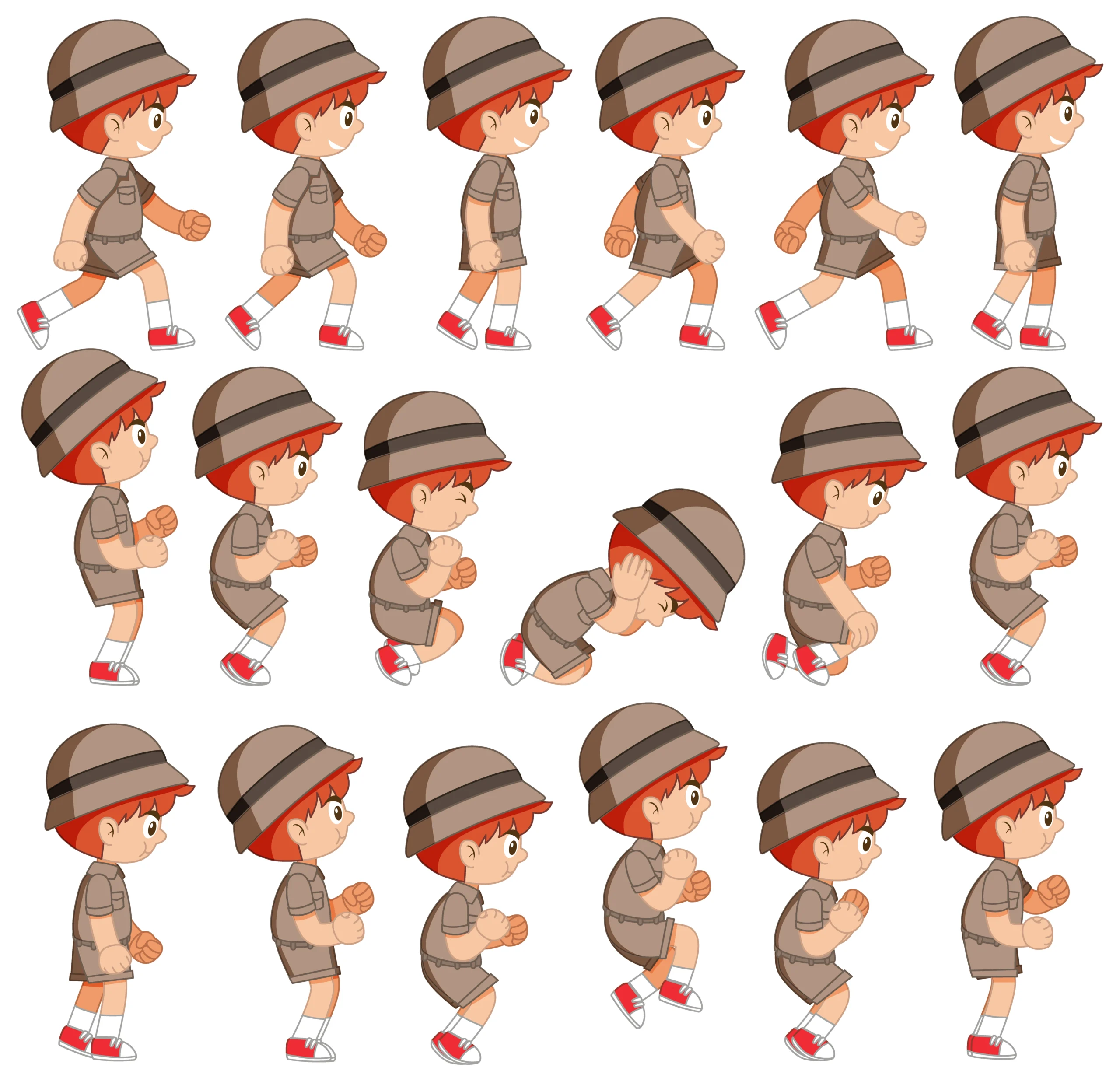
Animation frames are single, discrete images in a sequence that together form motion. Each frame represents a specific moment in time. When viewed quickly in sequence, our brain perceives continuous movement. The more frames used in a second, the smoother the animation appears.
Single Frame Definition
A frame is a discrete, static image that represents a single moment in an animation. It can be hand-drawn, digitally painted, or generated in 3D software. Each frame serves as a building block for the motion that audiences perceive when frames are played sequentially.
Role of Frames in Creating Motion
When frames are displayed rapidly, our brain perceives them as fluid motion. By controlling the number, timing, and type of frames, animators can create a variety of effects, from realistic movements to highly stylized, exaggerated actions.
Types of Frames in Animation
Understanding frame types helps 2D animators control timing, exaggeration, and pacing.
Keyframes
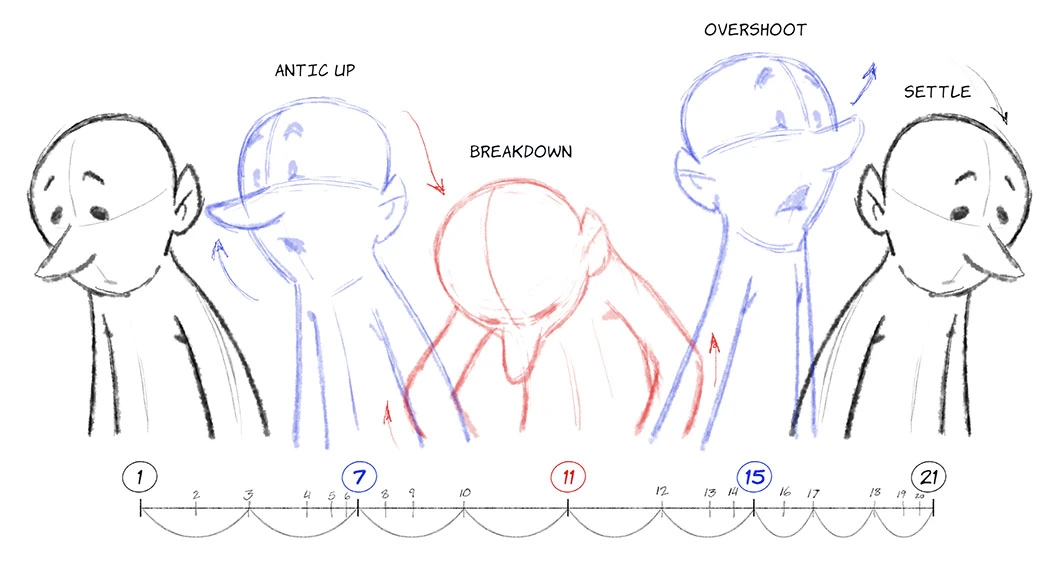
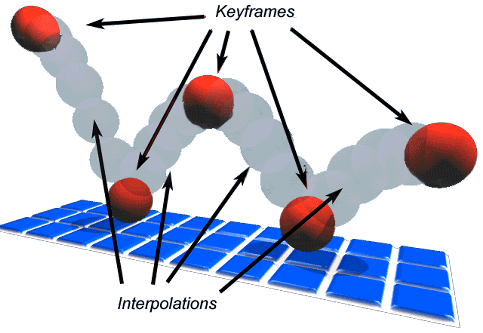
Keyframes are the main frames that define important poses or moments in an animation. They establish the start and end points of a movement. Animators rely on keyframe animation tips to structure the motion and ensure the action communicates the intended emotion or timing in keyframe animation.
In-Betweens
In-between frames, also called “tweens,” fill the gaps between keyframes. They define the motion trajectory and smooth out transitions. In 2D animation, in-between frames are often drawn by in-betweeners, assistant animators, and generated digitally.
Breakdown Frames
Breakdown frames describe complex arcs and timing between keyframes. They help refine motion, showing how objects or characters move from one keyframe to another, particularly in more dynamic sequences.
Exposure Frames
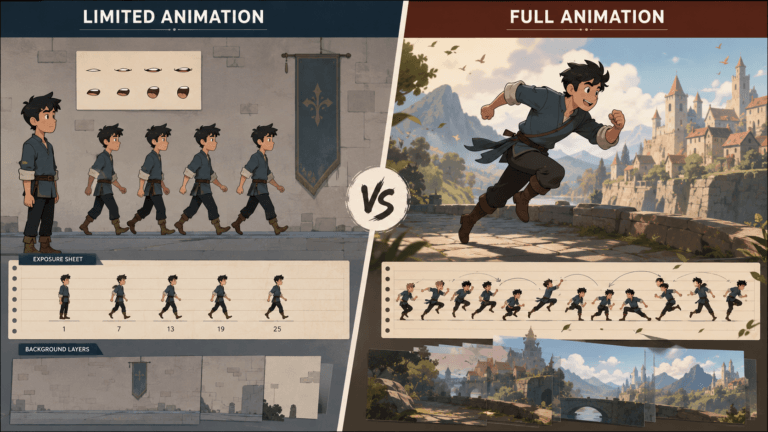
Exposure frames indicate how long each image is displayed. One keyframe can be held for multiple frames to slow motion, or spread across fewer frames to speed up action. Exposure frames help control the rhythm and feel of the animation.
Frames Per Second (FPS) in Animation
FPS measures how many frames are displayed per second of animation. It directly affects smoothness and perception of motion.
- 12 FPS: Common in traditional hand-drawn animation; creates a slightly choppy, stylized look.
- 24 FPS: Standard for film and cinematic animation; produces smooth motion while remaining resource-efficient.
- 30 FPS: Frequently used in TV, mobile, and web animations; slightly smoother than 24 FPS.
- 60 FPS and above: Used in video games and high-fidelity digital experiences for extremely smooth motion.
How FPS Impacts Motion
Higher FPS requires more frames and increases production time, but produces smoother motion. Lower FPS reduces workload and creates stylistic effects, which can be advantageous in indie animation, retro-style games, or motion graphics.
Choosing the Right FPS
The ideal FPS depends on the animation style, medium, and platform. Hand-drawn 2D animations often use 12 or 24 FPS. Feature films and AAA game cinematics typically use 24–30 FPS. Real-time games may target 60 FPS for smoother player interaction.
How Many Frames Are Needed?
The number of frames required depends on animation length, FPS, and motion complexity. For example:
- A 10-second animation at 24 FPS requires 240 frames.
- A 10-second animation at 12 FPS requires only 120 frames.
Animation complexity, motion speed, and stylistic choices also influence how many in-between or breakdown frames are necessary.oth visually compelling and technically accurate.
Frames in Different Animation Types
Animation frames are used differently across various animation types. While the fundamental concept remains the same, displaying sequential images to create motion, the way frames are created, managed, and optimized varies significantly between 2D animation, 3D animation, stop-motion, and motion graphics. Understanding these differences helps animators choose the right animation production workflow and frame rate for the specific animation services.
2D Animation Frames
Traditional and digital 2D animations use keyframes, in-betweens, and exposure frames to achieve fluid motion. Frame count varies with style: minimalist animations may require fewer frames, while frame-by-frame animations require hundreds of detailed drawings.
3D Animation Frames
3D animation often relies on keyframes and computer-generated interpolation. 3D animators adjust timing curves, spacing, and easing to create realistic or exaggerated movement efficiently.
Stop-Motion Animation Frames
Stop-motion requires capturing each frame manually. Even subtle adjustments between frames are crucial for believable motion, making FPS and exposure critical for timing and pacing.
Motion Graphics Frames
Motion graphics use frames strategically to guide attention, illustrate abstract concepts, and enhance readability. Timing and frame count are critical for ensuring clarity without overwhelming the viewer.
Timing and Spacing in Animation
Timing and spacing are two of the most important principles in animation. They determine not only how smooth a movement appears but also how audiences perceive weight, speed, emotion, and realism. Even with excellent drawings or models, poor timing and spacing can make an animation feel unnatural or unconvincing. By carefully controlling these elements, animators can create movements that feel dynamic, expressive, and believable.
The Role of Timing
Timing dictates how fast or slow a motion appears. It influences perception of weight, emotion, and physical realism. Precise timing ensures movements feel natural or achieve the intended dramatic effect.
The Role of Spacing
Spacing refers to the distance an object or character travels between frames. Evenly spaced frames create smooth movement, while varying spacing can simulate acceleration, deceleration, or impact.
Common Mistakes in Animation Frames
Managing animation frames effectively is essential for creating professional-quality motion. However, beginners and even experienced animators can encounter frame-related issues that negatively affect the final result. Problems such as inconsistent timing, insufficient in-between frames, or excessive frame counts can make animations feel awkward, difficult to follow, or unnecessarily expensive to produce. Understanding these common mistakes can help improve both animation quality and production efficiency.
Too Few Frames
Using too few frames can make animation appear choppy and unpolished, breaking immersion or comedic timing.
Too Many Frames
Excessive frames can overcomplicate production, increase render times, and slow down workflow without noticeable improvement in quality.
Inconsistent Timing
Uneven frame timing can disrupt rhythm, confuse the viewer, and make characters appear unnatural or robotic.
Tools for Managing Animation Frames
2D Animation Software
Popular 2D animation tools include Toon Boom Harmony, Adobe Animate, and Clip Studio Paint. Frame by frame animation software provide frame management, onion-skinning, and automated in-between generation.
3D Animation Software
Blender, Autodesk Maya, and 3ds Max allow keyframe animation, timeline control, and interpolation 3D animation tools to manage 3D frames efficiently.
Game Engines
Unity and Unreal Engine manage frames differently for real-time animation, using interpolation between keyframes for gameplay characters, objects, and environmental animations.
Conclusion
Animation frames are the core building blocks of motion in 2D, 3D, stop-motion, and motion graphics projects. Keyframes, in-betweens, breakdowns, and exposure frames work together to control pacing, realism, and emotional impact. Frame rate determines how smooth motion appears, while timing and spacing ensure movements convey weight, intention, and style.
By understanding frame types, FPS, and frame management techniques, animators can create professional-quality animations that engage, entertain, and communicate stories effectively. Mastery of animation frames is essential for filmmakers, game developers, and digital artists seeking high-quality motion in every project.




![1405,02,10 SnpLE[Cover HD] 1](https://pixune.com/wp-content/uploads/2026/08/14050210-SnpLECover-HD-1-768x431.jpg)